CATEGORIES
First steps
Frequently asked questions
News
Connection to the platform
Modules
Administration


The Pulse survey engine can be programmed automatically when you want to set up regular surveys (weekly, bi-weekly or monthly).
To do this, you must go to Administration, in the Engine Management section. By default, the engine is configured in Manual mode. You click on "Modify" to switch to automatic mode.

Once the automatic mode is activated, you can set the following information:
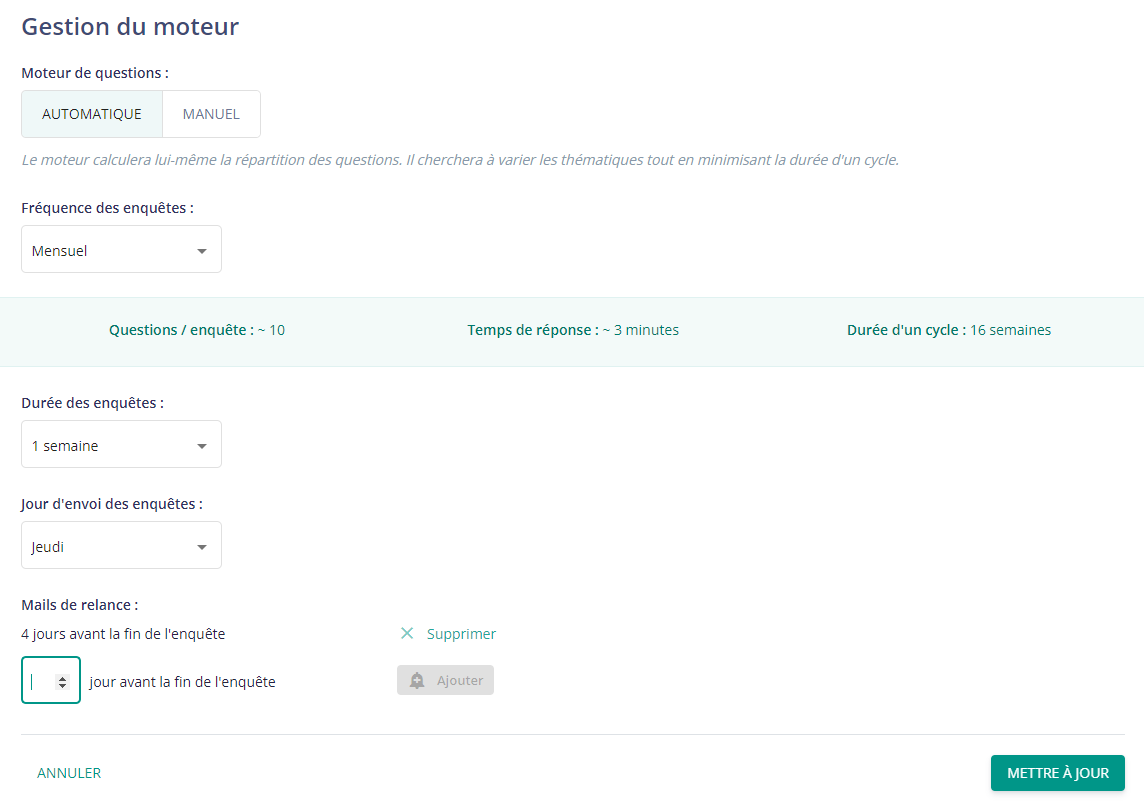
Below the frequency of the surveys, you will find a colored banner that tells you the approximate number of questions that will appear on each survey, the average response time and the length of a cycle.
Once you have made your choices, click on "Update" at the bottom right to save your changes.
To set the frequency of appearance of your questions on surveys, go to the Pulse driver library (Administration → Pulse driver list), click on a question and here, several settings are available:
Once these settings are defined, the Pulse engine will automatically organize the surveys.
To get an overview of the upcoming surveys, you can go to Survey Management: here you will find the dates of your upcoming surveys, as well as the questions that will constitute them.
If needed, you can modify the questions per survey by clicking on the modify button. You can then delete a question or add one.




